What is an f-string?
- f-strings provide a way to embed expressions inside string literals, using a minimal syntax. It should be noted that an f-string is really an expression evaluated at run time, not a constant value. In Python source code, an f-string is a literal string, prefixed with f, which contains expressions inside braces. The expressions are replaced with their values.
- In other words, f-strings provide a concise and readable way to create formatted strings in Python, without the need for complex concatenation or formatting functions.
- Variable Insertion Example:
python
1temperature = 75
2forecast = "rain"
3print(f"It's {temperature} degrees and predicted to {forecast}.")
Output:
1It's 75 degrees and predicted to rain.- Mathematical Expressions Example:
python
1accountBalance = 50000
2annualInterestRate = 0.045
3print(f"Annual interest amount: {accountBalance * annualInterestRate}")
Output:
1Annual interest amount: 2250.0- Formatting Numbers Example:
python
1accountBalance = 50000
2annualInterestRate = 0.045
3interestAmt = f"Interest: ${accountBalance * annualInterestRate:.2f}"
4print(interestAmt)
Output:
1Interest: $2250.00- Date Formatting Example
- A list of formatting codes can be found on docs.python.org
python
1from datetime import datetime
2graduationDate = datetime(2019, 5, 11)
3print(f"Hoshi Sato graduated on {graduationDate:%B %d, %Y}.")
Output:
1Hoshi Sato graduated on May 11, 2019.Field Width:
- The tab character (\t) can also be used in an f-string to line up columns, particularly when column headings are used.
- Example: The following lines produce an aligned set of columns displaying integers and their squares and cubes:
- The d-type in the f-string outputs the number in base-10.
python
1print(f'Number\t\tSquare\t\tCube')
2for x in range(1, 11):
3    print(f'{x:d}\t\t{x*x:d}\t\t{x*x*x:d}')
Output:
| Number | Square | Cube |
|---|---|---|
| 1 | 1 | 1 |
| 2 | 4 | 8 |
| 3 | 9 | 27 |
| 4 | 16 | 64 |
| 5 | 25 | 125 |
| 6 | 36 | 216 |
| 7 | 49 | 343 |
| 8 | 64 | 512 |
| 9 | 81 | 729 |
| 10 | 100 | 1000 |
Formatting Floats:
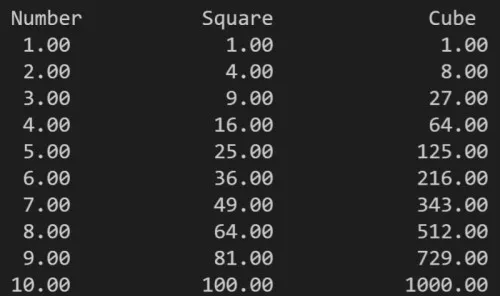
- The following takes the previous example, and converts x to a float() so that formatting of floating-point numbers and the use of a value for width will enable the columns to line up with decimals.
- Example:
python
1print(f'Number\t\tSquare\t\t\tCube')
2for x in range(1, 11):
3    x = float(x)
4 print(f'{x:5.2f}\t\t{x*x:6.2f}\t\t{x*x*x:12.2f}')- Output:
- Note this format specification for the value of x in {x:5.2f}. The 5.2f means that x should be formatted as a float with a minimum width of 5 characters and 2 digits after the decimal point. The 6.2f and 12.2f are similar, but with different widths.