Starting an App:
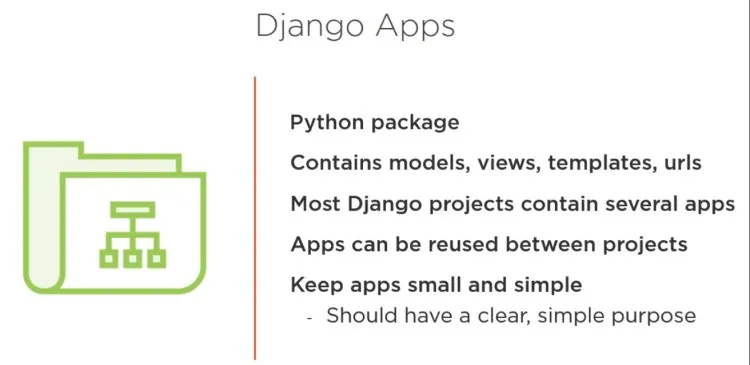
- A Django project is organized as a group of individual apps that work together to make the project work as a whole.
- In the directory that contains manage.py run the startapp command:
1python manage.py startapp code_journals- This command startapp appname creates the infrastructure needed to build an app.
- Look at the project directory now! You should see a new folder called code_journals
- Open the folder to see the newly created files, including: models.py, admin.py, views.py, etc.
- We’ll use models to define the data we want to manage in our app.
Defining a Model:
- Look here for a refresher on models. For additional resources click here.
- Open the file models.py to look at its existing content:
models.py
python
1from django.db import models
2
3# Create your models here.- Note we’re invited to create our own model:
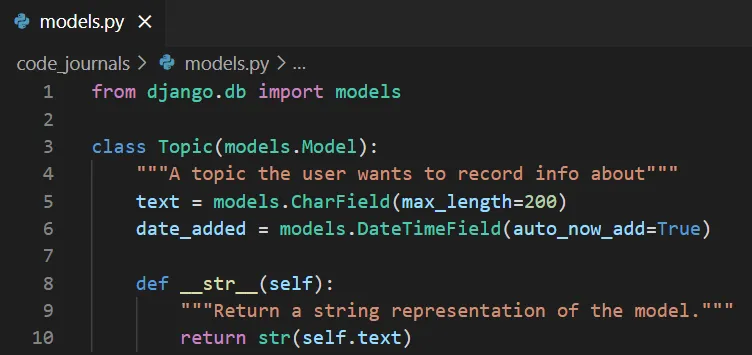
- Here we create a class called Topic.
- There are two attributes: text and date_added which are created in lines 5 and 6.
- Two arguments are passed max_length & auto_now_add = True
- CharField and DateTimeField are data types in the database.
- Two arguments are passed max_length & auto_now_add = True
- The str() method tells Django how to represent data objects based on this model.
How to Activate a Model:
- To use a model, the app must be added to the list, INSTALLED_APPS, which is stored in the project’s settings.py file.
settings.py

- Here we start a project under My apps which includes only code_journals
Migrate the Database:
- The database needs to be modified to store the kind of data that the model represents.
- The makemigrations command tells Django to figure out how to modify the database so it can store the data associated with any new models we’ve defined.
1python manage.py makemigrations code_journals- Terminal output:
1Migrations for 'code_journals':
2  code_journals\migrations\0001_initial.py
3 - Create model Topic- The migrate command has Django modify the database for us.
2python manage.py migrate- Terminal output - (Django should confirm that everything worked OK when it applied the migration for code_journals):
1Running migrations:
2  Applying code_journals.0001_initial... OK