Skip to content
  • 📓 CIS 335 Notebook
  • 📋 CIS 335 Schedule
  • ▶ Groups and Tools
    • ▶ Group Assignments
      • Group Assignments & Network Settings
      • VCAT
  • ▶ Lab Projects
    • ▶ Lab Project 1
      • 2 Server LAMP Based Application
  • ▶ Week 1
    • ▶ Lab Activity 1A
      • Objective
      • Create a Virtual Machine
    • ▶ Lab Activity 1B
      • Objective
      • Install and Update Rocky Linux
      • Confirm Setup and Connectivity
  • ▶ Week 2
    • ▶ Lab Activity 2A
      • Objective
      • Create a VM Template
    • ▶ Lab Activity 2B
      • Objective
      • Create and Deploy from Templates
  • ▶ Week 3
    • ▶ Lab Activity 3
      • Objective
      • Prerequisites
      • Config the Webmin Repository
      • Config MariaDB
      • Install PHP and WordPress
  • ▶ Week 4
    • ▶ Lab Activity 4
      • Objective
      • VM Cleanup
      • Install Windows Server and Config DNS
  • ▶ Week 5
    • ▶ Lab Activity 5
      • Objective
      • Create a Striped RAID Volume
      • Group Storage Area Network (SAN) Server
  • ▶ Week 6
    • ▶ Lab Activity 6
      • Objective
      • Group DNS Server and Cleanup
      • Binary Arithmetic and Subnetting
  • ▶ Week 7
    • ▶ Lab Activity 7
      • Objective
      • Config New DHCP Server Profile
      • Install and Configure DHCP on DNS Server
      • Deploy New VM from Template

Lab Activity 1A:

Objective: Create a virtual machine using VMware vSphere

Your work will be assessed based on the following:

  1. Correct VM Name and Folder based on your group
  2. Correct Host and datastore based on your group
  3. Correct Guest OS listed
  4. Correct RAM and Processor count
  5. Correct Network chosen based on your group

  • Submit a screenshot like the one that appears below, but with your settings:
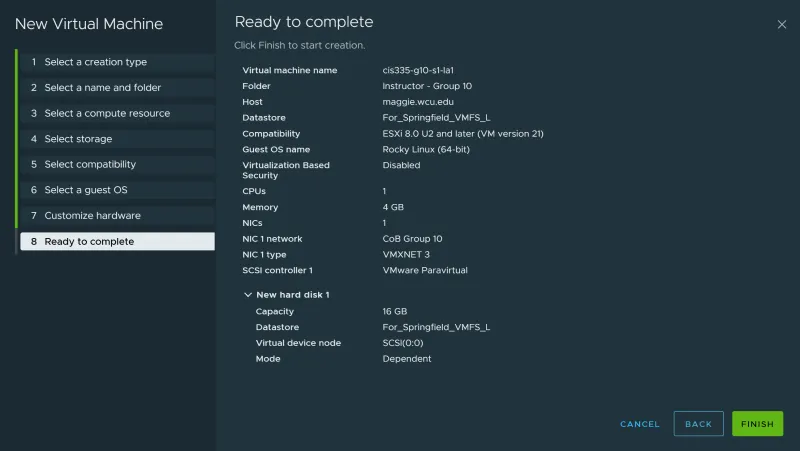
VMware new virtual machine wizard Ready to Complete page showing VM name, guest OS, CPU, memory, and network settings

← Previous 2 Server LAMP Based Application Next → Create a Virtual Machine

On this page

  • Lab Activity 1A:
  • Objective: Create a virtual machine using VMware vSphere