Ex 3.5 Sorting and Top N:
Objective: Learn how to Sort pandas DataFrames and select the Top N rows of a DataFrame.
- Create a new Jupyter Notebook file and name it Ex3.5_Sorting.ipynb.
- Work through parts 1 through 3 and submit your completed Jupyter Notebook (.ipynb) file to the first quiz question on Canvas. Your notebook should include both your code and the corresponding output that match the screengrabs provided below. Be sure to run all cells so that every output appears in the notebook.
Part 1:
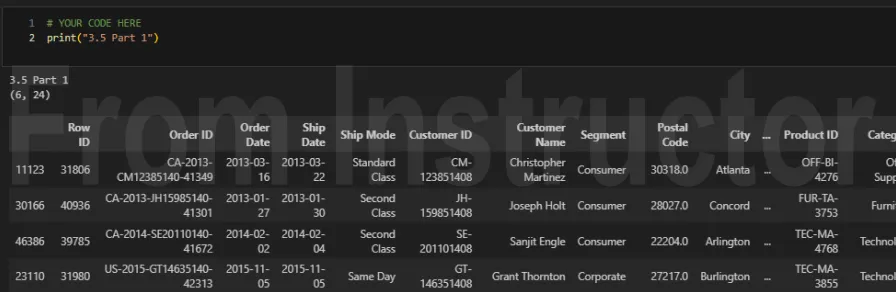
- Using the Orders worksheet in the Global Superstore 2016.xlsx file, write a bit of Python code that performs the following tasks:
- Filter to include only the following rows:
- a. North Carolina, Georgia, and Virginia
- b. With Sales greater than $3,000
- Sort by:
- a. Segment (alphabetically),
- b. Customer Name (alphabetically), and
- c. Sales (Greatest to Least)
Part 2:
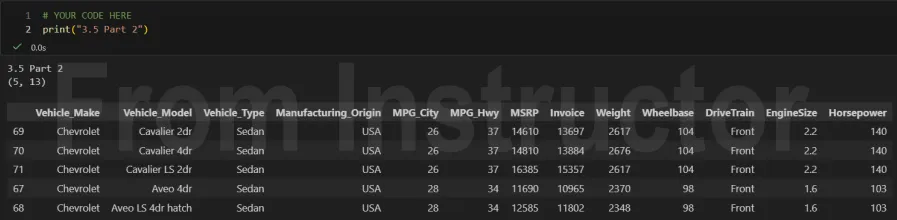
- Using the Cars.csv file, write code to answer the following question: What were the top 5 Chevrolets for MPG Highway?
- a. Sort this DataFrame by:
- i. MPG Highway (Greatest to Least) and
- ii. Vehicle Model (Alphabetically)
- a. Sort this DataFrame by:
Part 3:
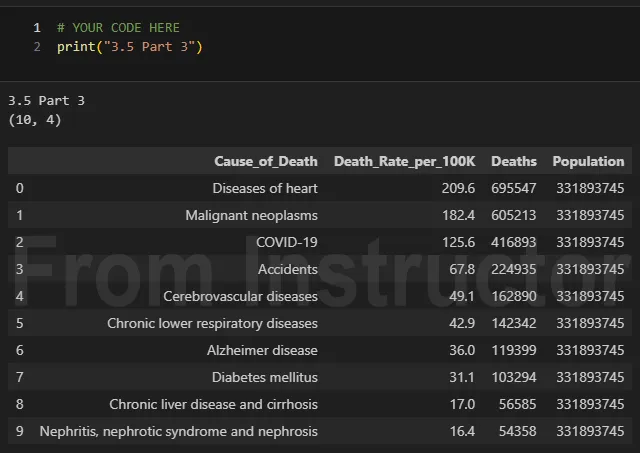
- Using the Leading_Causes_of_Death_2021.csv file, write code to answer the following question: In 2021, what were the Top 10 leading causes of death in the US?