Ex 4.3 Line Charts with Bokeh:
Objective: Explore how to create line and multi-line charts with Bokeh.
- Work through parts 1, 2, and 3, and submit BOTH your completed Jupyter Notebook (.ipynb) files to the first quiz question on Canvas. Your notebook should include both your code and the corresponding output that match the screengrabs provided below. Be sure to run all cells so that every output appears in the notebook.
Part 1:
- Create a new Jupyter Notebook file and name it Ex4.3_Bokeh_Line_Charts.ipynb.
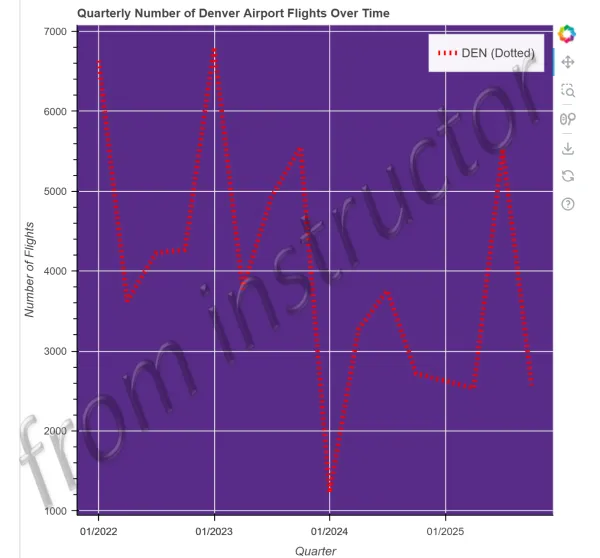
- Using the airline data.csv file, create the below Bokeh line chart displaying the quarterly number of Denver flights over time
Part 2:
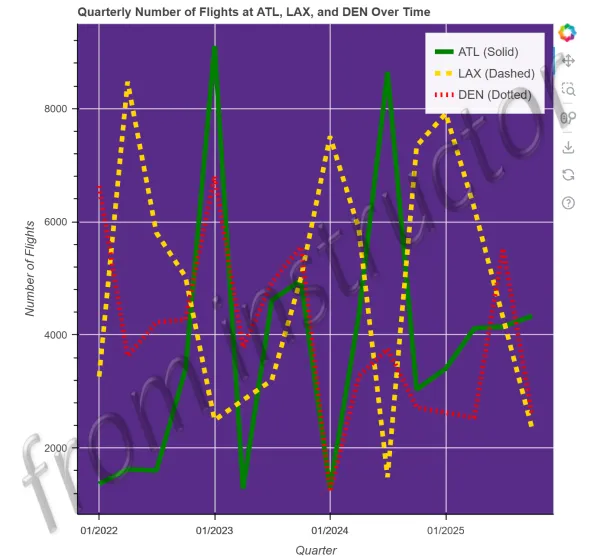
- Using the same Ex4.3_Bokeh_Line_Charts.ipynb notebook and airline data.csv file, create the below Bokeh multi-line chart displaying the Quarterly Number of Flights at ATL, LAX, and DEN Over Time.
Part 3:
- Create a new Jupyter Notebook file named, Ex4.3_Bokeh_Line_Charts_P3.ipynb
- Use the top-movies.csv data file and sort the DataFrame by year. Then, create a simple line chart showing the runtime of movies over the different years.
