Plotting with Matplotlib:
- Matplotlib is the cornerstone of many plotting activities in Python. It is both a widely used plotting package in its own right, and serves as the basis of plotting within both Pandas and Seaborn, which offer plotting functionality more centered on Pandas DataFrames.
- Matplotlib offers some different interfaces for plotting data, but the most widely used is the pyplot interface. Because matplotlib.pyplot is a lot to type, it is conventionally shortened on import as plt. The plt module provides many different functions for plotting data, customizing plots, and annotating plots.
Plotting a Series of Points with scatter():
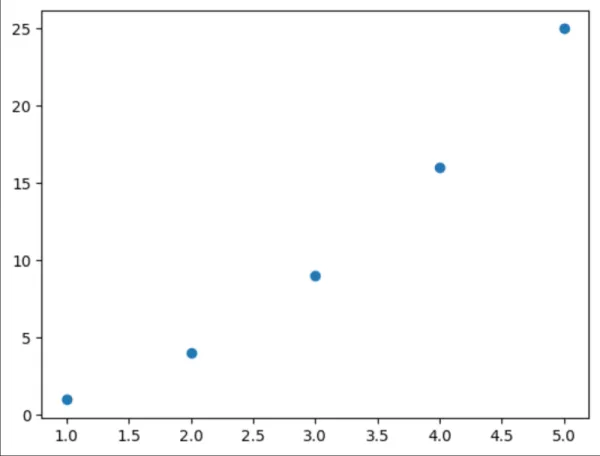
- To plot a series of points, we can pass scatter() separate lists of x and y values, like this:
python
1import matplotlib.pyplot as plt
2x_values = [1, 2, 3, 4, 5]
3y_values = [1, 4, 9, 16, 25]
4plt.scatter(x_values, y_values)
Output:
Using a Color Map:
- A colormap is a series of colors in a gradient that moves from a starting to an ending color. You use color maps in visualizations to emphasize a pattern in the data.
- To use a colormap, you need to specify how the pyplot should asssign a color to each point in the data set. In the below example, we can assign each point a color based on its y-value.
python
5plt.scatter(x_values, y_values, c=y_values, cmap=plt.cm.Reds, s=100)Output:

- We pass the list of y_values to c, and then tell pyplot which colormap to use with cmap. The s=100 argument sets the size of the points.
- You can find a list of colormaps here.